Posts mit dem Label Natty werden angezeigt. Alle Posts anzeigen

Freitag, 22. Juli 2011

How to set up a Sixaxis Controller with QJoypad in Ubuntu

Dualshock 3 Controller with a mini-USB-cable

We are going to connect the Controller via USB, so you make sure your Sixaxis Controller is plugged in with a mini-USB-cable.

First of all we install the joystick Package via
sudo apt-get install joystick
In order to make sure Ubuntu is able to read the Controller input execute
cat /dev/input/js0
Now move the sticks or press some buttons on the Controller. The text output (which is the raw controller data) in your terminal should change.
Qt's logo
QJoyPad, our Linux Xpadder or joy2key equivalent, is based on the Qt framework so we will have to install it as well.
sudo apt-get install libqt4-core  libqt4-dev qt4-dev-tools qt4-designer  qt4-doc
We will also need these packages
sudo apt-get install libxtst6 libxtst-dev


Now comes the more complicated part: Download QJoyPad. Open up a Terminal an execute the following commands in order to extract the source.
cd ~/Downloads
tar xzf qjoypad-4.1.0.tar.gz
compile the source:
cd cd qjoypad-4.1.0/src/
./config
make
sudo make install

QJoyPad will start minimized in the system tray, but Natty doesn't allow every application to show up in the system tray. We will change these settings; execute:
gsettings set com.canonical.Unity.Panel systray-whitelist "['all']"
After logging out and in again or simply restarting unity you will be able to execute qjoypad. Now you can take input from the controller translate it into key strokes or mouse actions. The UI should be self explanatory ;)


Donnerstag, 26. Mai 2011

How to turn off the log in sound in Ubuntu

If you are like me, and often switch between different OS, you will get annoyed by login sounds easily. I tried to turn the Ubuntu login sound off, but the option to do so is somewhat hidden.


The Ubuntu login sound.


The settings in gdmsetup, didnt change anything

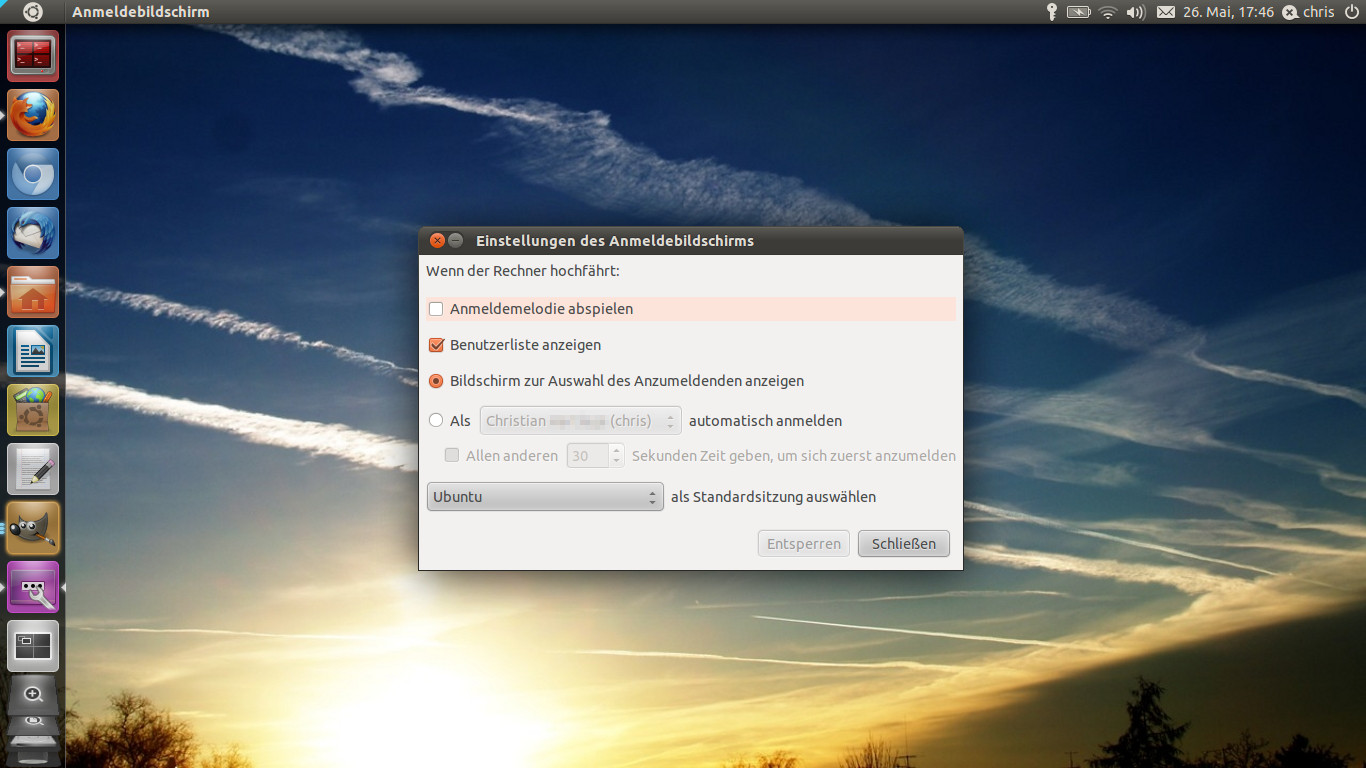
gdmsetup in german Unity options for gdmsetup in german
In order to turn off the login sounds you have to start gnome-session-properties:
gnome-session-properties in Unity Remove this check mark

In the gnome-session-properties search for "GNOME Login Sound" and remove the check mark
When you log in the next time, no login sound will be played :)


Here you can compare the Windows 7 login sound to the Ubuntu one
What do you think, which one sounds better?
And if you have a custom login sound for Windows or Ubuntu, leave a comment and let us know!

Anmeldemelodie bzw. Loginsound deaktivieren.

Da mich die Anmeldemelodie von Ubuntu ziemlich nervt, vor allem wenn der Sound aus versehen auf voller Lautstärke ist, habe ich versucht den Loginsound auszustellen.


Der Ubuntu Login Sound.


Die Einstellung im gdmsetup ( in Unity Anmeldebildschirm genannt ) bringt jedoch keine Veränderung.

gdmsetup in Unity Optionen von gdmsetup
Abhilfe schafft das Bearbeiten der Startprogramme (gnome-session-properties):
gnome-session-properties in Unity Das Häkchen entfernen

Dort nach "GNOME Login Sound" suchen und den Haken entfernen.
schon kann man Ubuntu starten ohne von der Startmelodie begrüßt zu werden.


PS Trotz aller Nervigkeit gefällt mir der Login Sound von Ubuntu beser als der von Windows ;)

Donnerstag, 19. Mai 2011

4 different wallpapers in Ubuntu 11.04 with Compiz

You want to have a different wallpaper on each workspace? Take a look at my screencast


The commands i used:

sagi compizconfig-settings-manager // installs the compiz settings manager

ccsm // starts the settings manager
gconf-editor // starts the gnome configuration tool
In the compizconfig-settings-manager search the wallpaper plugin, add the 4 wallpapers you want and then activate it.

Then start the gconf-editor and remove the check mark at apps>nautilus>preferences>show_desktop .

Your 4 workspace should now have different wallpapers.
If Unity displays the menubar or the dock incorrectly just log out and then log in again.

4 verschiedene Wallpaper in Ubuntu 11.04 mit Compiz

Die willst für jede der 4 Arbeitsflächen in Ubuntu 11.04 ein eigenes Hintergrundbild?
Wie das geht zeige ich hier in einem Screencast:


Die Befehle, die ich benutze:

sagi compizconfig-settings-manager // Installiert den Einstellungs-Manager von Compiz

ccsm // Startet  den Einstellungs-Manager

gconf-editor // Started das Gnome Konfigurations-Programm
Im Einstellungs-Manager von Compiz sucht man das Wallpaper-Plugin, stellt dort vier gewünschte Hintergrundbilder ein und aktiviert das Plugin dann.

Dann startet man den gconf-editor und entfernt das Häkchen unter apps>nautilus>preferences>show_desktop .

Eure 4 Workspaces sollten jetzt die verschiedenen Wallpaper anzeigen.
Wenn es, wie bei mir im Video auch, zu Darstellungsfehlern in Unity, z.B. in der Menüleiste kommt, einfach ab- und wieder anmelden.

Donnerstag, 5. Mai 2011

Ubuntu Natty Narwhal install - now with Youtube and HTML5 !

When you install a new OS like Windows, you will spend a lot of time just looking at the slowly moving progress bar. But not in Ubuntu!

Watch Youtube while installing Ubuntu Natty Narwhal!
I'm installing Ubuntu 11.04 right now on my Acer ASPIRE 5742G. But even the Ubuntu installation takes some time, so I opened up Firefox and visited my Homepage.

And I was pretty surprised when I was perfectly able to watch the Family Guy Dubstep Video i uploaded a week ago. The Adobe Flash player was not even installed. Seems like Ubuntu 11.04 and the shipped Firefox 4 browser support HTML5 videos Out Of The Box.

Good job Canoncial and the Ubuntu Community! And thank you Youtube for enabling HTML5 embedded Videos!

Ubuntu Natty Narwhal Installation - Mit Youtube und HTML5 !

Wenn man ein neues Betriebssystem wie Windows installiert verbringt man viel Zeit damit, einfach auf den Fortschrittsbalken zu gucken. "Da er hat sich bewegt - Nein doch nicht :( "
Nicht aber auf Ubuntu!

Youtube-Videos während der Installation von Ubuntu angucken!
Ich verfasse diesen Artikel gerade auf meinem Acer ASPIRE 5742G - und zwar während Ubuntu 11.04 installiert! Da aber auch die Installation von Ubuntu halt ihre Zeit braucht wollte ich mal schnell meine Homepage checken und -

- wurde ziemlich überrascht als ich ohne Probleme das Family Guy Dubstep Video anschauen konnte, das ich letzte Woche hochgeladen habe. Dabei habe ich nicht einmal den Adobe Flash Player installiert! Sieht so aus als unterstütze Ubuntu mit dem mitgelieferten Firefox 4 HTML5 Videos out of the box.

Hut ab Canoncial und an die Ubuntu Community! Und Dankeschön an Youtube, dafür dass ihr eingebette Videos auch in HTML5 unterstützt!

Sonntag, 3. April 2011

Ubuntu Maverick vs. Natty vs. Mint vs. Elementary

Here you can compare the default interfaces of the different Ubuntu versions and the derivates Linux Mint and Elementary OS. Which design do you prefer?
I'll examine the differences between the different versions in an upcoming post.

Ubuntu 10.10 (Maverick Meerkat)
Ubuntu 11.04 (Natty Narwhal)
Linux Mint
Elementary OS